Reusable Templates in Jira - A Practical Guide with Vilisoft
%20(1).png)
This article was brought to you by our partner Vilisoft, Silver Marketplace Partner from Poland.
In medium and large companies, people often spend time creating the same types of work items over and over again. It could be a bug report, an IT support ticket, a customer request, a new employee onboarding task, a change request, or a project task.
Since these work items usually follow the same structure, creating them from scratch is unnecessary. Reusable templates help teams save time, keep information consistent, and make sure nothing important is missed.
📌 KEY TAKEAWAYS
- Repeatable work is based on a stable structure, even when dates, owners, projects, and other details change.
- A Jira template can be a single reusable work item or a complete hierarchy of related work items.
- Well-designed templates make backlog preparation faster and help teams avoid missing important tasks or information.
- Consistent work structures and field values improve reporting, process visibility, and control.
- Templates should be validated, clearly marked, separated from active work, and easy for teams to find.
- Jira’s built-in cloning works well for straightforward reuse, while pre-clone customization provides more control over complex structures.
When Do We Need a Jira Template?
Not every recurring activity needs a template. A template becomes useful when the structure of the work remains largely consistent, even though the details change with each execution.
Repeatable work usually includes several of the following elements:
- a similar hierarchy of work items
- recurring tasks, stories, or subtasks
- consistent dependencies and issue links
- predefined fields, labels, or ownership rules
- reusable descriptions, instructions, or checklists
- common attachments, links, or reference materials
- details that need to be updated for each execution, such as dates, assignees, projects, or context-specific information
This is when a Jira template built based on work items adds real value: when recurring work follows a consistent structure but requires different details each time.
What Do We Mean by a “Work Item Template”?
A work item template can be as simple as a single reusable task or as complex as a complete hierarchy containing higher-level work items, Epics, stories, tasks, and subtasks.

It may also include dependencies, predefined field values, descriptions, checklists, attachments, and other content that should be reused.
Examples of Repeatable Work in Jira
Repeatable work exists in every organization and across many different teams. The examples below illustrate how reusable templates can be applied in various business areas.
Throughout this guide, we use employee onboarding as a practical example of a repeatable, cross-team process.
How to Build a Template Library
The following steps explain how to turn repeatable work into a structured and maintainable template library in Jira using native Jira functionalities.
Step 1: Define the Full Scope of the Template Before Jira
Start outside Jira:
- Review past executions of the process
- Choose a model run (or the most common version)
- Extract the full set of tasks, steps, responsibilities, and required outputs
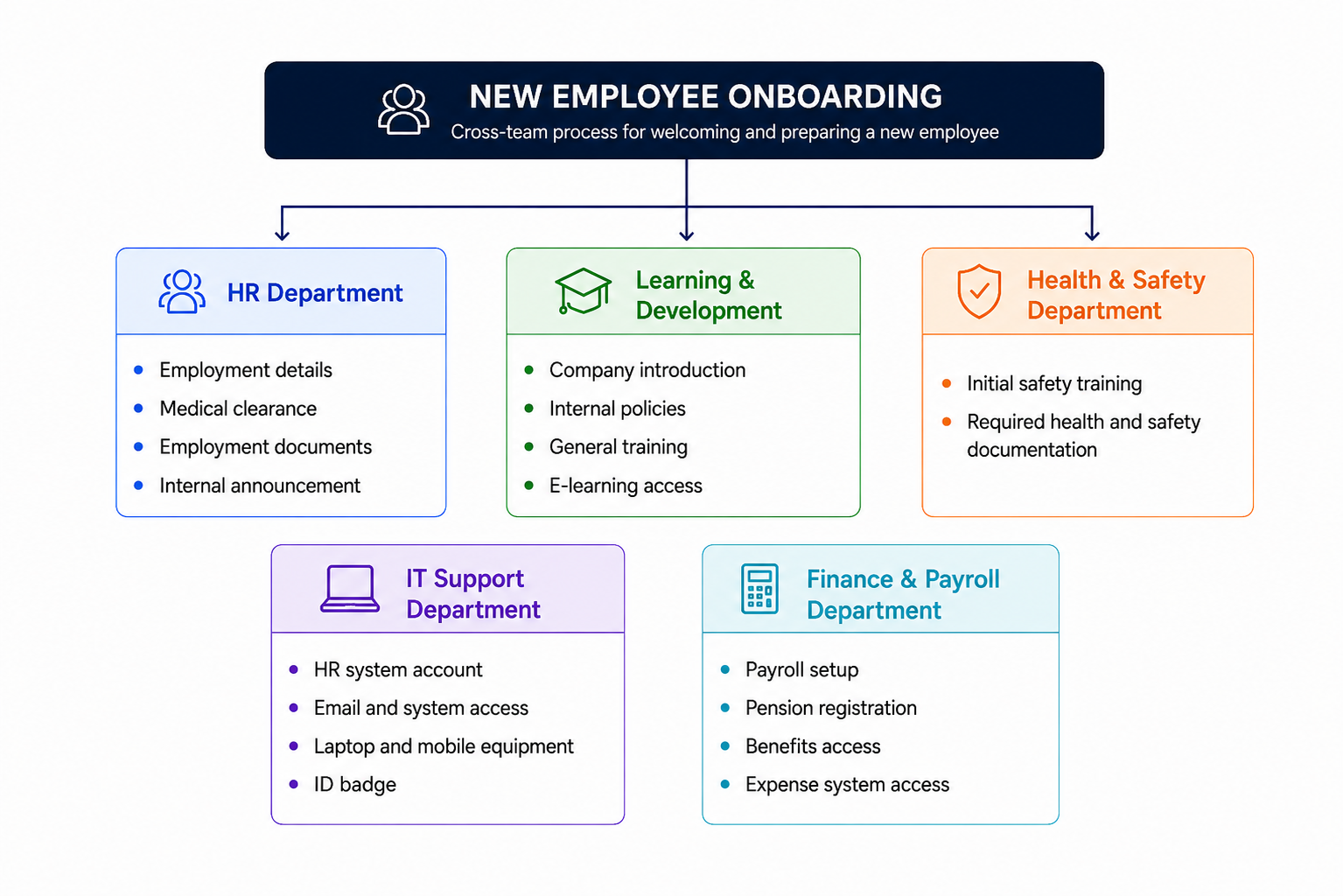
This becomes the baseline template that you can refine over time.
Step 2: Validate the Template With the People Who Actually Do the Work
To avoid building a beautiful template that nobody uses:
- review it with process owners
- confirm it with people who executed it before
- include managers who will approve the standard approach
This prevents the classic failure mode where something looks excellent from an administrative perspective but collapses during actual execution.
Step 3: Build the Work Item Hierarchy in Jira
Now create the structure in Jira using a consistent pattern:
- In most cases, create a master Epic that represents the complete template.
- Create the remaining template work items as children of that Epic.
- Add subtasks under the relevant parent work items where needed.
- If the template spans multiple Jira projects, decide whether to store its work items in the relevant delivery projects or in a dedicated template project.
- Add issue links and dependencies where the process requires relationships beyond the parent-child hierarchy.
- If your Jira hierarchy includes levels above Epic, the template can start with a higher-level parent, with Epics and other work items placed underneath it.
The right approach depends on permissions, field compatibility, and how the template will be reused. Whichever model you choose, keep the hierarchy and dependencies aligned with the actual delivery structure.
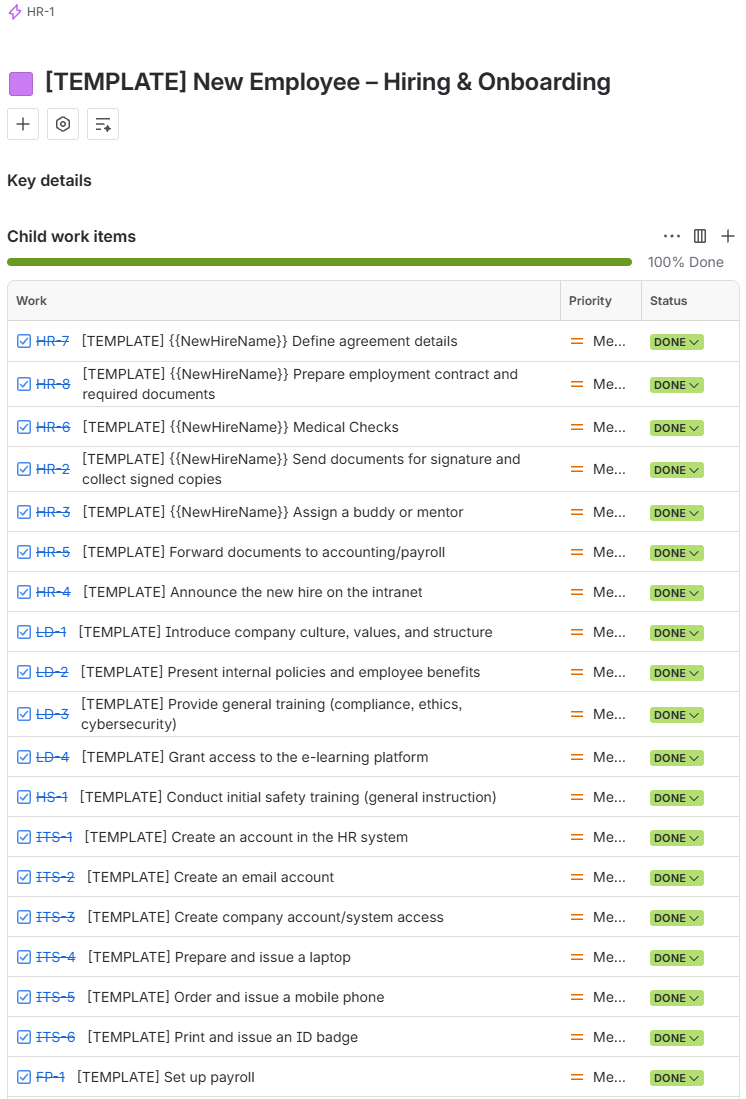
The template should reflect how the work is really delivered, not a simplified structure that only looks neat in Jira.
Step 4: Write Template Content That’s Reusable
This is where templates either become useful or gradually turn into outdated clutter.
Recommended practices:
- Add a clear prefix to the Summary, such as [TEMPLATE].
- Create a simple custom field, such as Template, and mark template work items accordingly.
- Write descriptions so they are:
- generic enough to reuse
- specific enough to be actionable
- Use formatting that helps execution:
- checklists (checkboxes)
- bullets
- links to standards
- attachments such as guides, forms, and examples
When using placeholders such as {{NewHireName}}, {{HiringDate}}, {{ManagerName}}, apply them consistently across the complete template structure. They can serve as visible markers for values that need to be updated for each execution.
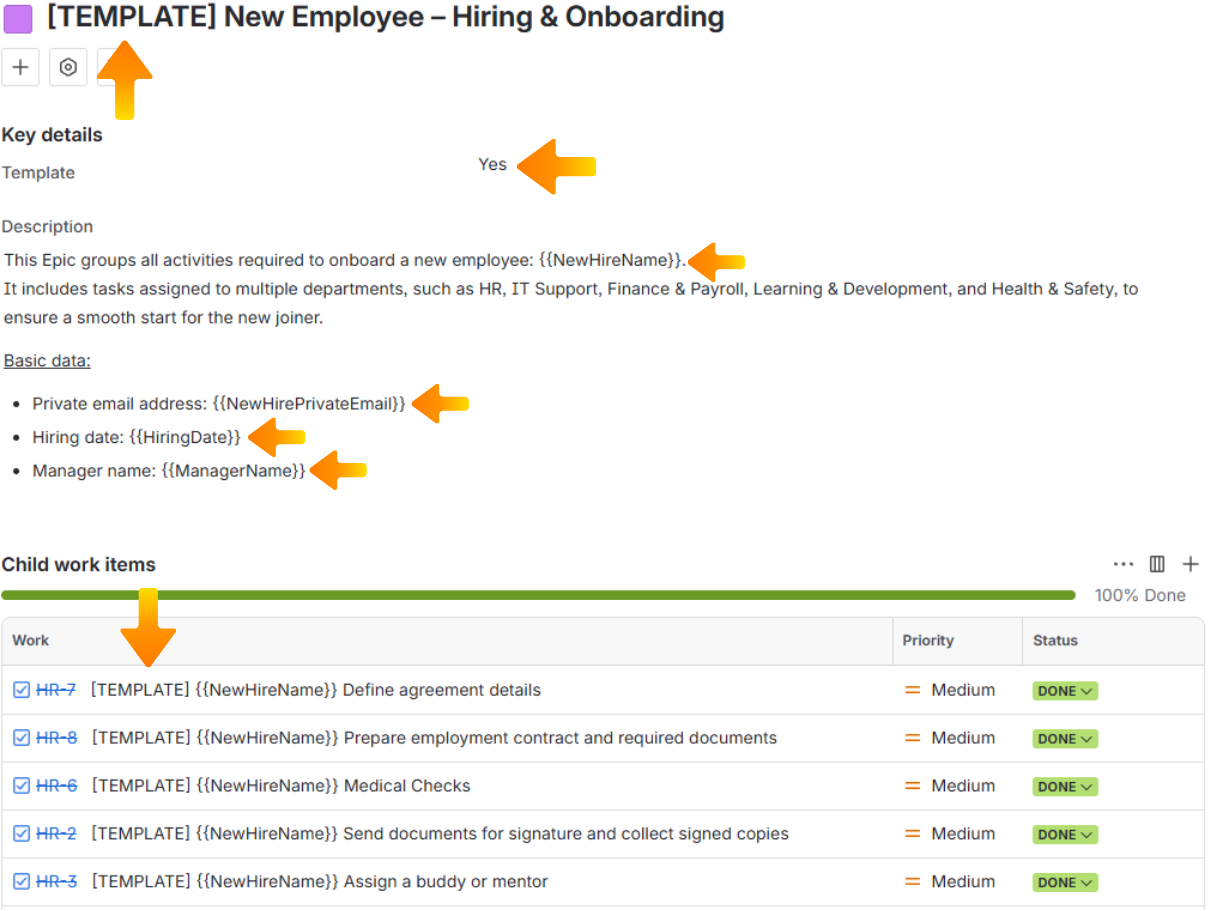
Templates should reduce the number of edits required, not create another maintenance task.
Step 5: Keep Template Work Items Separate From Active Work
Template work items should not clutter active backlogs, operational dashboards, or reports.
Depending on your Jira setup, you can separate them by:
- storing them in a dedicated template project
- marking them with a custom field or label
- moving them to a terminal status such as Done
This helps:
- keep templates out of active backlogs and make them easier to exclude from operational reports
- reduce the risk that someone accidentally starts working on a template item
- create a visible distinction between template content and real delivery work
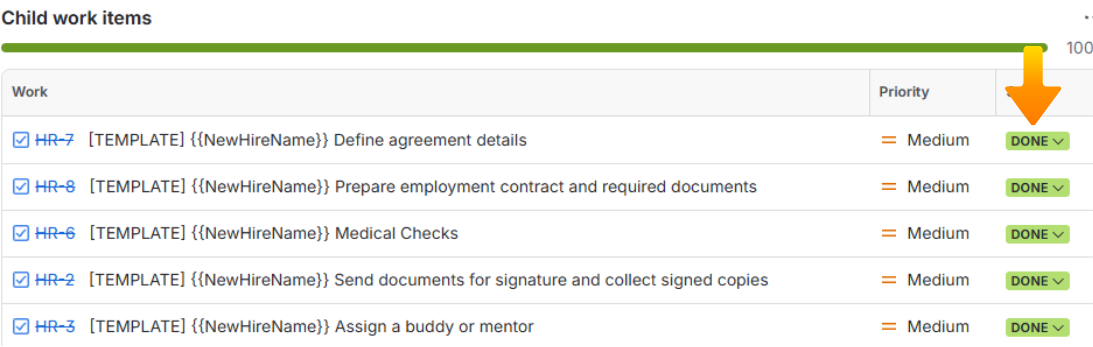
Whatever method you choose, the objective is the same: templates should be easy to find but clearly separated from active execution.
Step 6: Create Filters and Dashboards for Easy Access
If templates are hard to find, people will not use them.
Create filters for template work items, either globally or for individual projects.

You can also create dashboards that show:
- available templates
- templates grouped by department or work type
- widely applicable templates
- templates available for a specific Jira project
The template library should be visible and easy to access for the people who need it.
Two Ways of Using Templates
Once you have templates prepared, you have two realistic ways to reuse them.
Option 1: Jira’s Built-in Clone
Jira’s built-in cloning can duplicate work items together with their child work items, making it a practical option when the new structure should closely match the original.
For straightforward reuse, this may be sufficient. However, its primary purpose is duplication rather than reviewing and customizing the complete structure before the new work items are created.

Option 2: Clone With Pre-Clone Customization
Alternatively, a specialized tool such as Clone Expert for Jira provides more control over how a template is reused. The complete work item hierarchy is displayed before cloning, allowing teams to review and customize the new structure before any work items are created.
Teams can:
- review the complete work item hierarchy
- choose which work items should be included
- select the target projects
- update dates, assignees, descriptions, and other field values using individual and bulk edit options
- verify the final structure before starting the cloning process
- automatically replace placeholders with execution-specific values


This makes it possible to adapt the complete template to a specific execution in one place, rather than cloning it first and updating individual work items afterward.
The result is a ready-to-use work structure that reflects the current execution while remaining consistent with the original template.
Quick Comparison: Native Jira Clone vs. Clone Expert
Both options can be used to reuse work item templates. The right choice depends on how closely the new work should match the original structure and how much customization is required before the work items are created.
Advantages of Jira’s Built-in Clone
Jira’s built-in clone is a good choice when:
- the cloning scenario is simple or occasional
- the new work should closely match the original
- no additional app should be installed or maintained
- only limited changes are required
Advantages of Clone Expert for Jira
Clone Expert is a better fit when:
- the template contains a larger or more complex hierarchy
- users need to review the complete template structure before cloning
- the template needs to be adapted to a specific execution by updating fields in bulk or with placeholders, and by adding or excluding selected work items
- work items need to be created in different target projects
- templates are reused frequently, and repeatable work needs to follow a consistent structure to support reliable reporting and process control
Final Thought: Turn Repeatable Work Into a Reusable System
A well-managed template library can speed up backlog preparation, reduce the risk of missing important work, and improve the consistency of data used for reporting and process monitoring.
Using Jira’s native features, teams can build a practical and maintainable template library without additional tools.
When the structures become more complex and require customization before reuse, tools that support hierarchy cloning and pre-clone editing can reduce manual work and make the templating approach easier to scale.
Because recurring work should not require rebuilding the same structure from scratch every time.

Z Jira i Confluence praca zespołowa nie musi być trudna

Unlock business growth with Salesforce

Zmień dane w decyzje dzięki Splunk Platform

.png)

.png)
