%20(1).png)
This article was brought to you by our partner DevSamurai, Atlassian Gold Marketplace Partner.
Imagine this: It’s late afternoon, and you open Jira to review the week’s progress - only to find missing logs, vague entries, and tasks with little to no recorded effort. What should be a quick check turns into guesswork.
If you find this familiar, you’re not alone. Jira time logging often gets pushed to the end of the day or week, when people rely on memory instead of real data. And that approach simply doesn’t work well. Studies by Accelo show that end-of-week time tracking is only about 47% accurate, compared to 66% accuracy when done daily. That means a significant portion of your data may not reflect reality.
For project managers, this creates a real problem. Without accurate time logs, it becomes difficult to track progress, plan effectively, or make confident decisions.
The solution isn’t stricter enforcement. On the contrary, time tracking should be easy and natural, as well as an integral part of your daily work.
What is Jira time logging?
Jira time logging refers to the process of recording how much time is spent working on specific tasks or tickets within Atlassian Jira. While the concept itself is straightforward, its impact on project management is a lot more significant than you might think.
When time is logged accurately, it becomes a reliable source of truth for how work is executed across a team. Project managers can use this data to:
- Track progress more effectively
- Compare estimated versus actual effort
- Identify areas where planning can be improved
It also plays a crucial role in resource management, helping teams understand capacity and avoid overloading individuals.
Beyond project execution, time logging supports financial and operational needs. For organizations that bill clients based on time, accurate logs are essential for invoicing. For leadership teams, time data provides insights into productivity, efficiency, and overall project performance.
In short, Jira is about more than just tracking hours. Its goal is to increase visibility and improve decision-making at every level.
Who works with time logging
Jira time logging is used by a wide range of roles within an organization, each relying on it for different but equally important purposes.
1. Development teams
For development teams, time logging in Jira helps track the effort spent on tasks, bugs, and user stories. This becomes especially valuable during sprint reviews and retrospectives, where teams reflect on what was planned versus what was actually delivered.
Over time, consistent time tracking helps developers improve their estimation accuracy and better understand their own working patterns.
2. Project managers and Scrum masters
Project managers and Scrum Masters rely heavily on time logging to monitor team workload and overall progress. By comparing planned effort with actual time spent, they can identify discrepancies early, adjust priorities, and ensure that projects remain on track. This visibility also supports better sprint planning and more realistic forecasting.
3. Operations and Support teams
For operations and support teams, time logging is closely tied to ticket and incident management. Tracking time spent on each request helps improve SLA performance, measure responsiveness, and maintain a clear view of workload distribution.
In tools like Jira Service Management (JSM), accurate time tracking also supports better incident resolution and ensures timely follow-ups. Without accurate logs, it becomes difficult to evaluate efficiency or identify areas for improvement.
4. Finance and Leadership
At the organizational level, finance teams and leadership use time logging data for cost allocation, profitability analysis, and client billing.
In service-based businesses such as agencies or consultancies, time data directly impacts revenue. Meanwhile, inaccurate or inconsistent logging can lead to underbilling, misreported costs, and poor strategic decisions.

The challenges with logging time in Jira, daily
Despite its importance, many teams struggle to maintain consistent and accurate time logging. These challenges are often rooted in how the process fits-or fails to fit-into daily workflows.
1. Heavy reliance on manual entry
One of the most common issues is the reliance on manual input. Logging time in Jira typically involves several steps:
- Opening a work item
- Selecting the log work option
- Entering details
- Saving the entry
While this may seem minor, it becomes repetitive and time-consuming for users handling multiple tasks throughout the day. Over time, this friction discourages consistent usage.
2. Easy to forget
From the friction mentioned earlier, we tend to leave time tracking for later and focus more on the work. As a result, time logging is frequently postponed until the end of the day or even the end of the week. And by that point, it becomes difficult to recall exactly what was worked on and for how long.
This leads to missed entries or rough estimations, which significantly reduce the accuracy and reliability of the data.
3. Lack of context
In fast-paced environments where multitasking is common, remembering the details of each activity can be challenging. Without a clear reference, users may log vague or incomplete information. This lack of context makes the data less useful for analysis and decision-making.
4. Disconnected workflow
Another major challenge is that time logging often exists separately from the actual work being performed. Users are required to pause their tasks, navigate to Jira, and manually record time.
As a result, this constant context switching interrupts focus and reduces productivity, making time logging feel like an additional burden rather than a natural part of the workflow.
5. Inconsistent practices across teams
Without standardized guidelines, different team members develop their own approaches to time logging.
Some log daily, others weekly; some provide detailed notes, while others log minimal information. Such inconsistency leads to unreliable data, making it difficult to generate meaningful reports or draw accurate conclusions.
How to make Jira time logging simple and accurate
To make the process intuitive and efficient, improvements to time tracking should be integrated into the team’s current workflow.
1. Shift from retroactive to real-time logging
Encouraging team members to log time as they work, rather than after the fact, is one of the most effective ways to improve accuracy. Real-time logging reduces the need to rely on memory and ensures that data reflects actual effort.
Besides, it also minimizes the mental effort required to reconstruct the day’s activities.
2. Integrate time logging into daily workflow
Time logging should be embedded into the natural flow of work rather than treated as a separate task.
When users can log time directly while updating tasks or completing activities, the process becomes seamless. Reducing the need for context switching increases the likelihood of consistent adoption.
3. Use visual planning as a reference
Providing a visual overview of tasks, whether on a daily or weekly basis, helps users track their work more naturally. Instead of relying on memory, they can refer to their schedule or board to understand what they worked on. This not only improves accuracy but also reduces cognitive load.
4. Standardize logging practices
Establishing clear and simple guidelines ensures consistency across the team. This includes defining when time should be logged, what level of detail is required, and which types of tasks need to be tracked. Additionally, standardization makes the data more reliable and easier to analyze.
5. Reduce friction with better UX
The easier it is to log time, the more likely people are to do it. The same thing happens to Jira time logging. By optimizing the process and minimizing frictions, project managers can encourage members to log time for their daily work more frequently.
Therefore, reducing the number of clicks, minimizing manual input, and enabling intuitive interactions can significantly improve user experience. Even small improvements, such as inline editing or drag-and-drop, can lead to better adoption.
6. Track capacity vs actual effort
Time logging becomes far more valuable when it is connected to planning. By comparing planned capacity with actual logged time, project managers can identify inefficiencies, detect overload early, and make more informed decisions. This transforms time tracking from a passive activity into an active management tool.
7. Encourage habit building
Consistency in time logging comes from building habits rather than relying solely on reminders. Therefore, encouraging routines-such as logging time before daily stand-ups or at the end of each day-helps reinforce the behavior. And over time, it becomes a natural part of the workflow.
How Teamboard TimePlanner helps
While improving processes is essential, having the right tool can make a significant difference. Teamboard TimePlanner is designed to simplify Jira time logging by integrating it directly into daily work.
The Schedules Board provides a visual representation of tasks, allowing team members to see their workload at a glance. This makes it easier to plan, track, and recall work (if someone is overloaded) throughout the day.
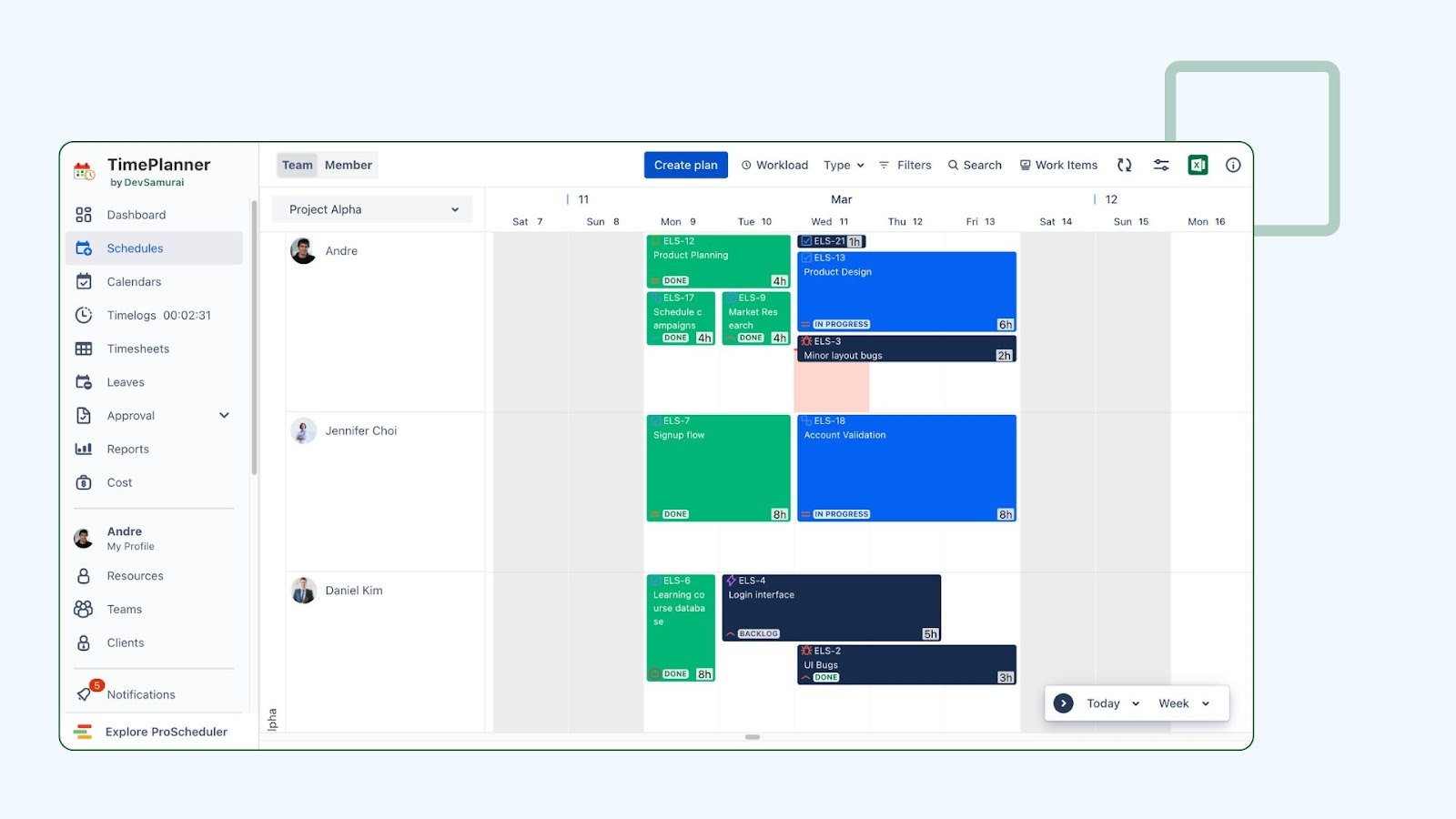
So instead of navigating through multiple work items, users can rely on a centralized view to manage both tasks and time.
Additionally, TimePlanner offers a built-in stopwatch timer that enables real-time tracking with minimal effort. Users can start and stop the timer as they work, ensuring that time is recorded accurately without the need for manual input later.
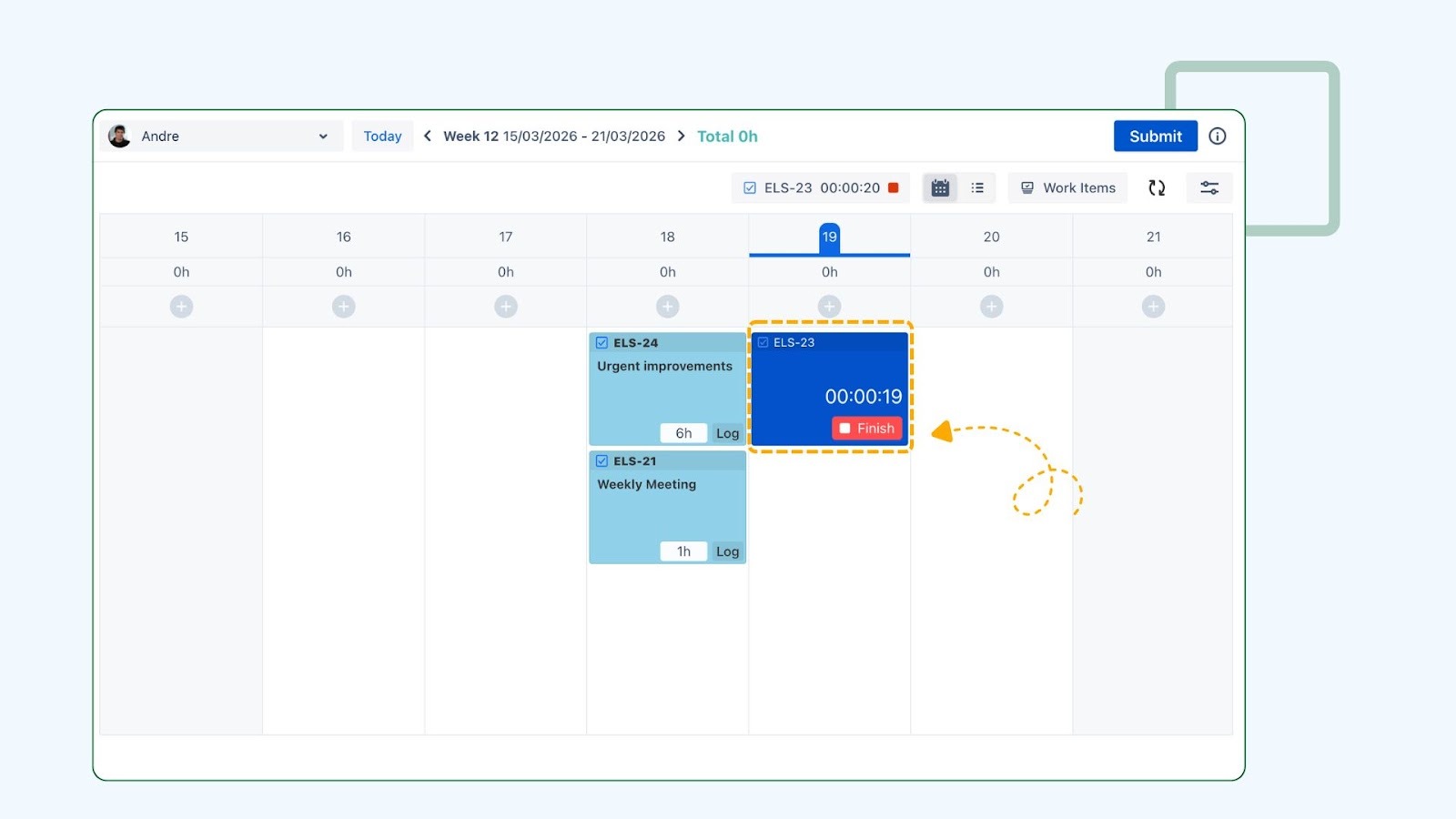
With this, members can eliminate guesswork and improve data quality. Just don’t forget to clock in when you start working and clock out when done, so that you don’t have to explain to HR why you have OTs in the middle of the night.
By combining planning and time logging in a single interface, Teamboard TimePlanner reduces friction and eliminates the need for constant context switching. This leads to better adoption, more consistent logging practices, and ultimately, more reliable data for decision-making.
Conclusion
Jira time logging is often perceived as a tedious task, but in reality, it is a critical component of effective project management. When done correctly, it provides the visibility needed to track progress, manage resources, and make informed decisions.
The key to success lies in simplifying the process. By reducing friction, integrating time logging into daily workflows, and encouraging consistent habits, teams can achieve accurate and reliable time tracking without added complexity.
As a project manager, your role is to create an environment where time logging feels natural and valuable rather than burdensome. With the right practices and tools in place, it can become a seamless part of your team’s workflow-and a powerful driver of better outcomes.

Z Jira i Confluence praca zespołowa nie musi być trudna

Unlock business growth with Salesforce

Zmień dane w decyzje dzięki Splunk Platform

.png)

.png)
