Why Migration to Forge Is Non-Negotiable for Atlassian Apps and How to Get Started?
%20(1).png)
This article was brought to you by our partner Wombats Corp, Atlassian Marketplace Partner creating apps for Jira and Confluence.
Welcome to the world of tech, where the only constant is change and timing is everything. And right now, if you’re developing apps on Atlassian, the clock is ticking - Forge migration is no longer optional, it’s essential.
Atlassian has announced the end-of-life (EOL) for the Connect app framework by 2026, and with this comes the inevitable shift to Forge. If you haven’t started migrating yet, now’s the time to act, before it’s too late.
The Connect app framework will no longer receive updates, leaving vendors with less than a year to make the switch. In a world where keeping up with evolving technology is paramount, this is a shift no vendor can afford to ignore. So, what does this mean for you, and more importantly, what does it mean for your business?
Let’s dive into why this migration matters right now.
What’s at Stake: The Push to Forge
Why the Urgency?
Atlassian is phasing out Connect, which means that there will be no opportunity to update Connect apps after 2026.
So, no, you can’t just keep your app running until then. The transition to Forge isn’t just a technical upgrade; it’s about ensuring that your app stays relevant, future-proof, and aligned with Atlassian’s long-term vision.
Forge is Atlassian's new cloud app development platform for building Jira and Confluence Cloud apps. It allows developers to host apps on infrastructure that is provisioned, managed, monitored, and scaled automatically by Atlassian.
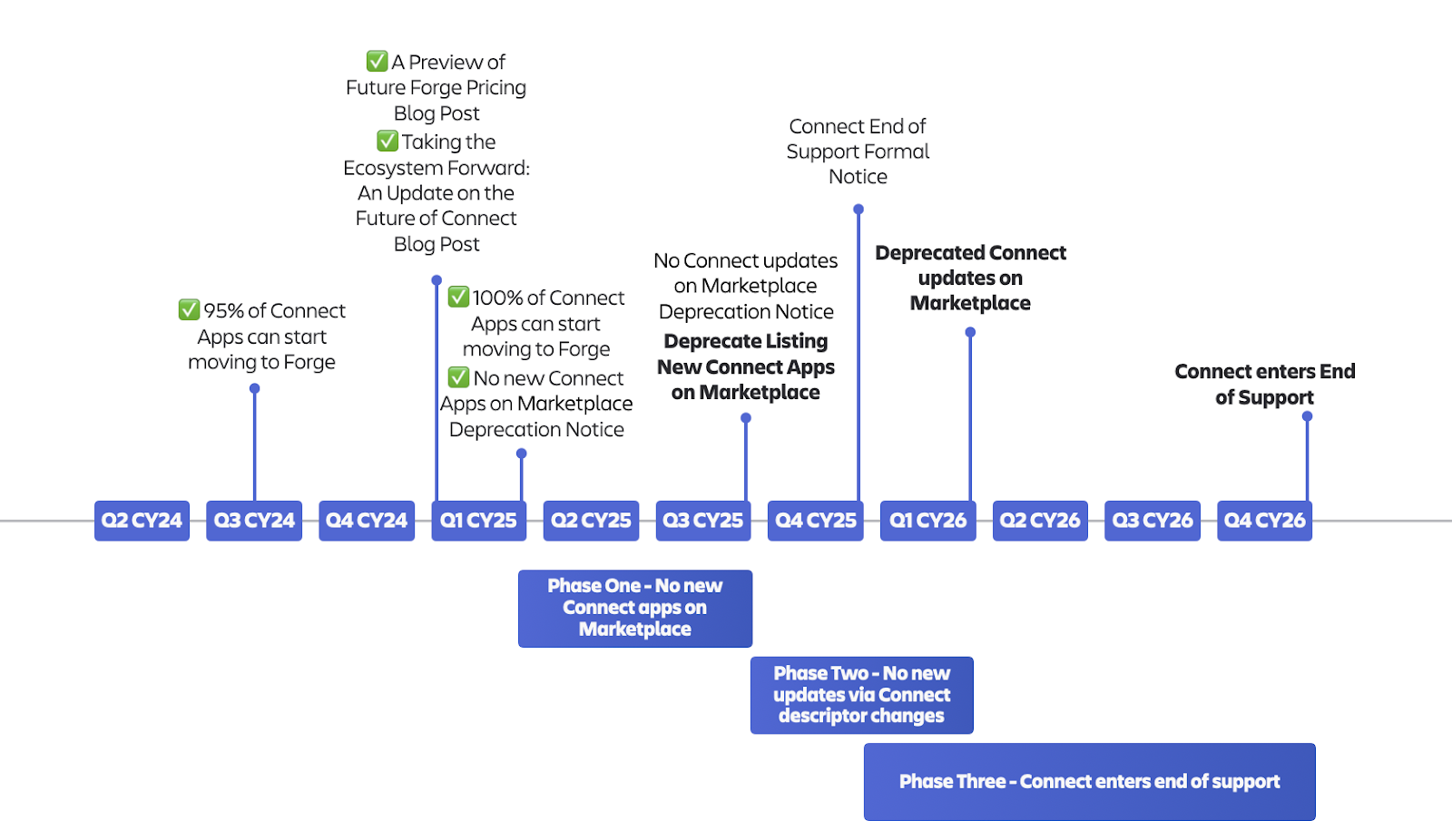
But the switch goes beyond mere compatibility. It involves modernizing your app’s infrastructure to make it secure and scalable. With Forge, you’re not just changing platforms, you’re positioning your business for long-term success.
What Is Cloud Migration, and Why Does It Matter?
In simple terms, cloud migration means moving your app from physical, on-premise servers to a cloud-based platform that’s more flexible, scalable, and secure. This is exactly what Forge offers - it’s Atlassian’s cloud platform, designed to help your app stay relevant, even long after Connect is gone.
Key Benefits of the Forge Platform
Now, you might be thinking: “What does Forge bring to the table, other than the obvious necessity of migration?” The answer is a lot, and it’s not just a ‘nice to have,’ it’s a ‘must have.’
Here are some of the core benefits of Forge:
- Standards & Certifications
Forge comes covered under Atlassian’s ISO 27001 certification and SOC 2 attestations, ensuring that your app meets the highest standards of security and compliance. - Architecture
Forget about building complex infrastructure. With Forge, you get a secure execution environment (FaaS) that handles tenancy isolation, authentication, and scaling - all out of the box. - Data Encryption & Isolation
Forge provides end-to-end encryption, with data both in transit (TLS 1.3) and at rest (AES-256) being securely protected. Plus, data isolation is enforced, ensuring that tenants’ data is never compromised. - Data Residency
If your business operates across different regions, Forge’s data residency features come pre-configured to handle it seamlessly.
Atlassian has taken significant steps to simplify the migration process, but let’s be real: nothing worth having comes easy. While Forge offers a ton of benefits, the transition isn’t without its challenges. Some features from Connect, like limitations on navigation modules, dynamic modules and certain UI extensibility options, are still missing or under development in Forge.
These gaps may pose some challenges depending on your app’s specific needs, but rest assured, Forge is evolving, and Atlassian is actively working to fill these gaps.
The Challenges of Migration - What to Expect
While cloud migration has its perks, it’s not all smooth sailing. Moving from Connect to Forge can be challenging, and here’s why:
- Feature Gaps
Not every feature that exists in Connect is available in Forge just yet. Some things might be missing, and others might work differently. For instance, dynamic modules and certain UI extensibility features are still being worked on. - Complexity
Migrating to Forge isn’t a one-click task. There’s a learning curve, and the process requires careful planning. But here’s the thing: when you break it down into steps, it becomes much more manageable. - UI Adjustments
If your app relies on a complex, custom-designed UI, you might run into some limitations when moving to Forge. The transition to Forge UI Kit or Custom UI will require some tweaking, but the end result will be a more streamlined, future-proof app.
But here’s the good news...
These challenges might sound tough, but they’re not impossible to overcome. With the right plan, you can handle them easily. In the next section, we’ll break down the migration process into simple steps. Taking it one step at a time will help you avoid problems and make sure the move to Forge goes smoothly.
Migration to Forge - A Step-by-Step Plan
Although Atlassian has made things easier, let’s be honest - migration is still a journey, not a sprint. This will take time and effort, but it’s an investment that will pay off in the long run. The good news is that, by following a structured migration path, you can ensure each step of the process is clear, manageable, and leads to better outcomes for your app and business.
Let’s walk through the process step-by-step:
Step 1: Adopt Forge from Connect
This is the entry point into Forge. The goal here is not to rewrite your app, but to wrap your existing Connect app with Forge infrastructure. You introduce the Forge manifest, adopt the Forge folder structure, and prepare your app for staged migration and Marketplace approval under Forge rules.
At this stage:
- Most of your backend and UI can remain unchanged.
- Forge acts as the control plane (manifest, permissions, deployment).
- You unlock the ability to migrate customers gradually instead of all at once.
Why it matters
This step is mandatory. It establishes compatibility with Atlassian’s future platform direction and ensures your app can continue evolving as Connect is phased out. This stage also ensures that your app will remain functional and maintainable as Atlassian moves towards Forge-based development. Furthermore, migrating users gradually helps avoid disruptions.
Typical timeline
- ~2 weeks of engineering work.
- Plus, unknown additional time for Marketplace approval and staged migration rollout. It might be an additional 2 weeks, but keep in mind that the exact timing for approval may vary depending on the complexity of your app and the integrations involved.
All apps can reach this step, because it’s mostly about changing the descriptor file.
Apps migrated to Forge may end up in a weird or phantom installation state, showing as installed when they aren’t, complicating uninstall/update workflows. Proper testing and validation should be conducted during this stage to address any potential issues.
Step 2: Move UI to Forge Custom UI
This is where things start to get interesting. Moving your frontend to Forge Custom UI means your app’s UI will run within Atlassian’s infrastructure. While this step is often the most noticeable for end users, it aligns your app with Forge’s hosting and security model.
Why it matters
Custom UI supports modern frontend frameworks like React, Vue, and others. It enables you to stay on the cutting edge without completely redesigning your app’s interface.
However, it comes with some important limitations:
- Restricted network access.
- Sandboxed execution.
- Tighter performance and security constraints.
These restrictions ensure your app operates securely and efficiently within the Forge ecosystem, but they might require some adjustments to your code and workflows.
Timeline
Expect this step to take approximately 2 months, depending on the complexity of your UI and any dependencies. The migration process may vary slightly depending on the size of your frontend and the specific features you use.
All apps can reach this step, as it is focused on dividing the frontend code and migrating it into Custom UI, while keeping the backend unchanged.
Step 3: Adopt Forge UI Kit with Remotes
Here, things get a little more refined. This step replaces Custom UI with Forge UI Kit, while still allowing your app to rely on remote services for complex backend logic. If your app has a more intricate or custom UI, this transition might require additional adjustments.
UI Kit is more structured:
- Less flexibility than Custom UI.
- Stronger integration with Atlassian look & feel.
- Faster loading and better platform alignment.
The trade-off is clear:
The more complex the interface, the harder this transition becomes.
Why it matters
Forge UI Kit dramatically reduces maintenance overhead and improves long-term compatibility with Forge, but it’s not suitable for every UI-heavy app.
Timeline
This step typically takes around 1.5 months, depending on the complexity of your UI and its dependencies. The process might take more time for apps with more sophisticated frontend features.
Applicability
- ~60% of apps can realistically reach this stage.
- Best suited for simpler, workflow-oriented interfaces.
Step 4: Become a Fully No-Egress Forge App
This is the “end state” Forge vision - a fully Atlassian-hosted app with:
- Forge backend functions.
- Forge storage.
- No external network egress.
- Full “Runs on Atlassian” compliance.
At this point, your app no longer depends on external infrastructure, which significantly improves security, compliance, and operational simplicity.
Why it matters
This unlocks the highest trust level with customers and Atlassian, reduces hosting costs, and minimizes operational risk.
Timeline
Typically, this step takes around 2.5 months, depending on the complexity of your app and its dependencies.
Applicability
Around 75% of apps can reach this stage, though some may remain partially remote due to domain-specific constraints.
The End Goal: Runs on Atlassian Badge
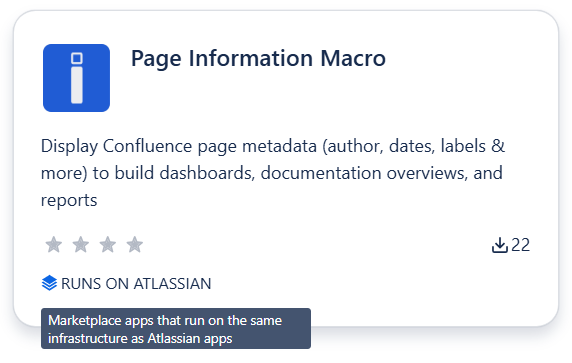
The ultimate goal of migrating to Forge is to earn the “Runs on Atlassian” badge. This badge shows that your app is fully integrated into Atlassian’s ecosystem, with no external connections, ensuring top-notch security and performance.
At its core, this badge means one simple thing: your app does not rely on infrastructure outside of Atlassian’s cloud.
- No external hosting.
- No unexpected data egress.
- Full control over customer data.
For customers, this is a strong trust signal. For vendors, it’s a clear indicator that the app aligns with Atlassian’s security and compliance expectations.
An important nuance: you don’t need to complete every migration step to earn this badge. It can already be achieved at Step 2 or Step 3, even when using Forge Custom UI. The key requirement isn’t how far you migrate, but how customer data is handled.
Not every app needs to reach Step 4 immediately or at all. Each migration step brings value, and the right stopping point depends on your app’s complexity, UI needs, and business goals.
What is Your Next Step?
While the migration to Forge may seem daunting, it is, without a doubt, a necessary step for the future of your app. The sooner you begin the process, the sooner you can future-proof your app and provide users with a seamless experience.
Don’t wait until the deadline is looming. Act now, stay ahead of the curve, and make sure your app thrives in Atlassian’s cloud ecosystem for years to come.
Ready to make the move?
Let’s talk about how we can help you navigate the Forge migration process and set your app up for future success.

More about Wombats Corp:
Wombats Corp is an Atlassian Marketplace Partner with 280K+ active users worldwide. We help businesses succeed through smart, effective technology solutions for Jira and Confluence to enhance productivity, administration, and user experience.Proudly backed by Atlassian Ventures and trusted by global enterprises, includingPfizer, Nvidia, BNP Paribas, HP, Hyundai, Index, and more.
We specialize in:
- Atlassian marketplace apps development
- Atlassian custom development & Connect to Forge migration
- Data Center to Cloud migration
- Consulting & Atlassian suite configuration
.png)
Founder of Wombats Corp and Software Engineer with 15 years of experience, focused on the Atlassian ecosystem and delivering enterprise solutions. www.linkedin.com/in/roman-bubiakin

Simplify tasks and teamwork with Atlassian

Unlock business growth with Salesforce

Transform your data into smart decisions with Splunk

.png)
.png)
