.png)
In manufacturing, work never really stops. Orders need to be sent, documents completed, and new leads acquired - and all of this requires good organization and a reliable system. Project management tools are what make work easier. Jira by Atlassian is one such solution - built for teams of all sizes and packed with features that help work faster and improve visibility.
Here are 7 Jira features especially useful for manufacturing teams:
1. Scrum and Kanban boards
Boards are the foundation of Jira - they help teams manage tasks within a project. The layout of each board depends on the project type and methodology you use. Jira supports Agile, Lean, Waterfall, XP, SAFe, hybrid approaches, and more. One of its greatest strengths is flexibility - teams can tailor Jira to their own needs and even extend it with scripts or apps.
Scrum board - Scrum is a popular framework among software teams. On a Scrum board, teams only see tasks from the current sprint, while the rest stay in the backlog. A sprint is a short, iterative work cycle focused on a specific part of the project - a key principle of Agile.
"With Scrum, a product is built in a series of iterations called sprints that break down big, complex projects into bite-sized pieces,” said Megan Cook, Head of Product for Jira at Atlassian.
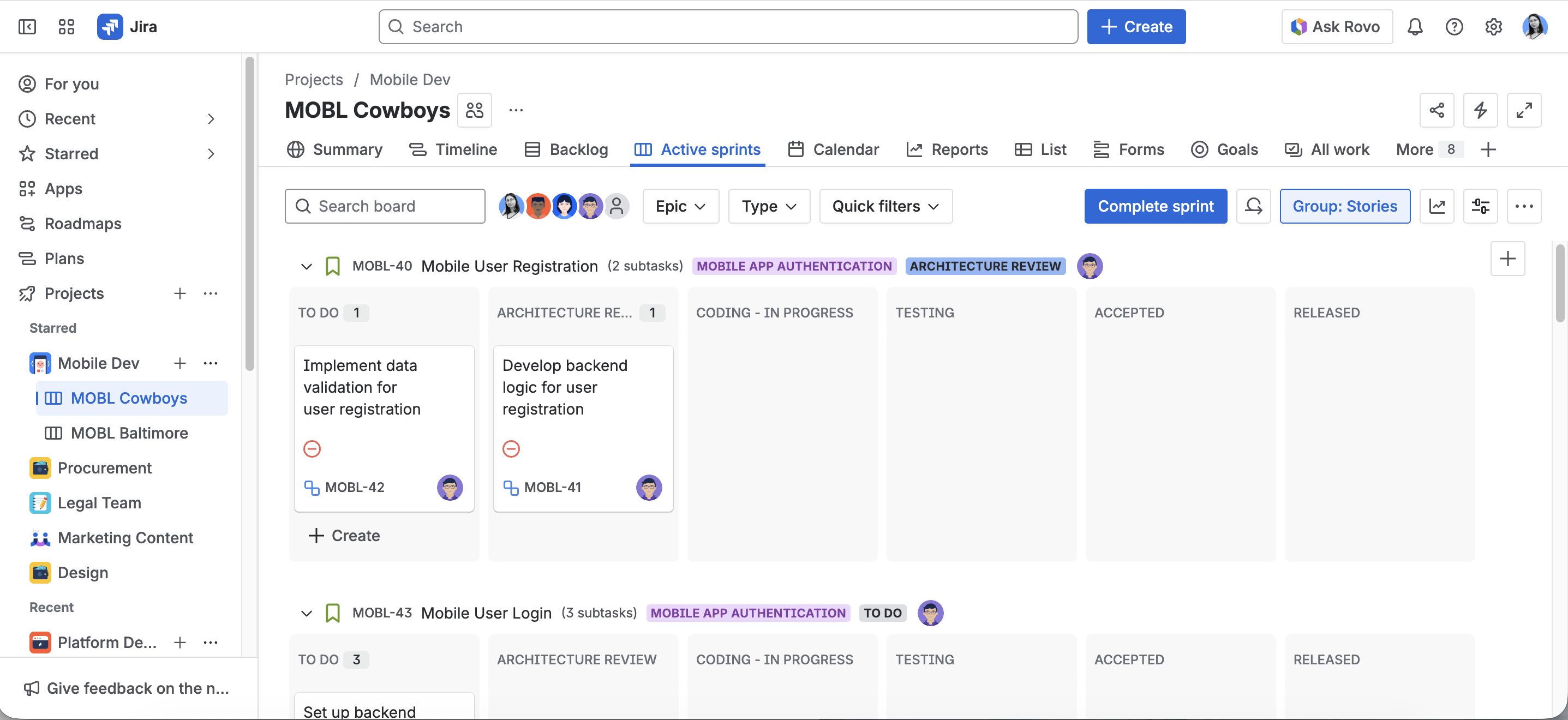
Kanban board - Kanban has its roots in Toyota’s 1940s production system. Today, a Kanban board shows tasks as cards moving through workflow stages (e.g., To Do → In Progress → Done). Teams can set Work in Progress (WIP) limits to control how many items can be in a given stage, helping to identify bottlenecks and prevent overloading.

2. Multiple project views (List, Timeline, Calendar)
Every project can be viewed from different angles - as a list, timeline, calendar, or board - depending on your needs. Each view can be filtered by parameters like status, assignee, task type, label, or category. Filters can be created, saved, and reused at any time - making it easy to focus on the information that matters most.


The Summary view gives a quick snapshot of overall progress, team workload, and task types.
.png)
3. Automations (Jira Automation)
Automations let Jira handle repetitive tasks for you without you 🙂 You define a rule: if certain conditions are met, then Jira performs specific actions. It’s a no-code feature, so anyone with admin rights can set up automations - no programming skills required.
Example automation rules:
- When all subtasks are completed → automatically mark the parent issue as Done.
- When a sprint ends → move unfinished tasks to the next sprint or backlog.
- When an issue is labeled “Blocked” → assign it to the Scrum Master and send a Slack/Teams alert.
- When a “High” priority issue has no update for 24 hours → assign it to the quality manager and send an email alert.
- When status changes to “Delivery Received” → create follow-up tasks for “Inspection” and “Storage Update.”
- When an issue is overdue by 2 days → notify the assignee and their supervisor.
- When a new project is created → automatically add a standard task set (e.g., client onboarding, production planning, quality control).
In short, your only real limit when building automations is your imagination 🙂


4. Issues and sub-tasks
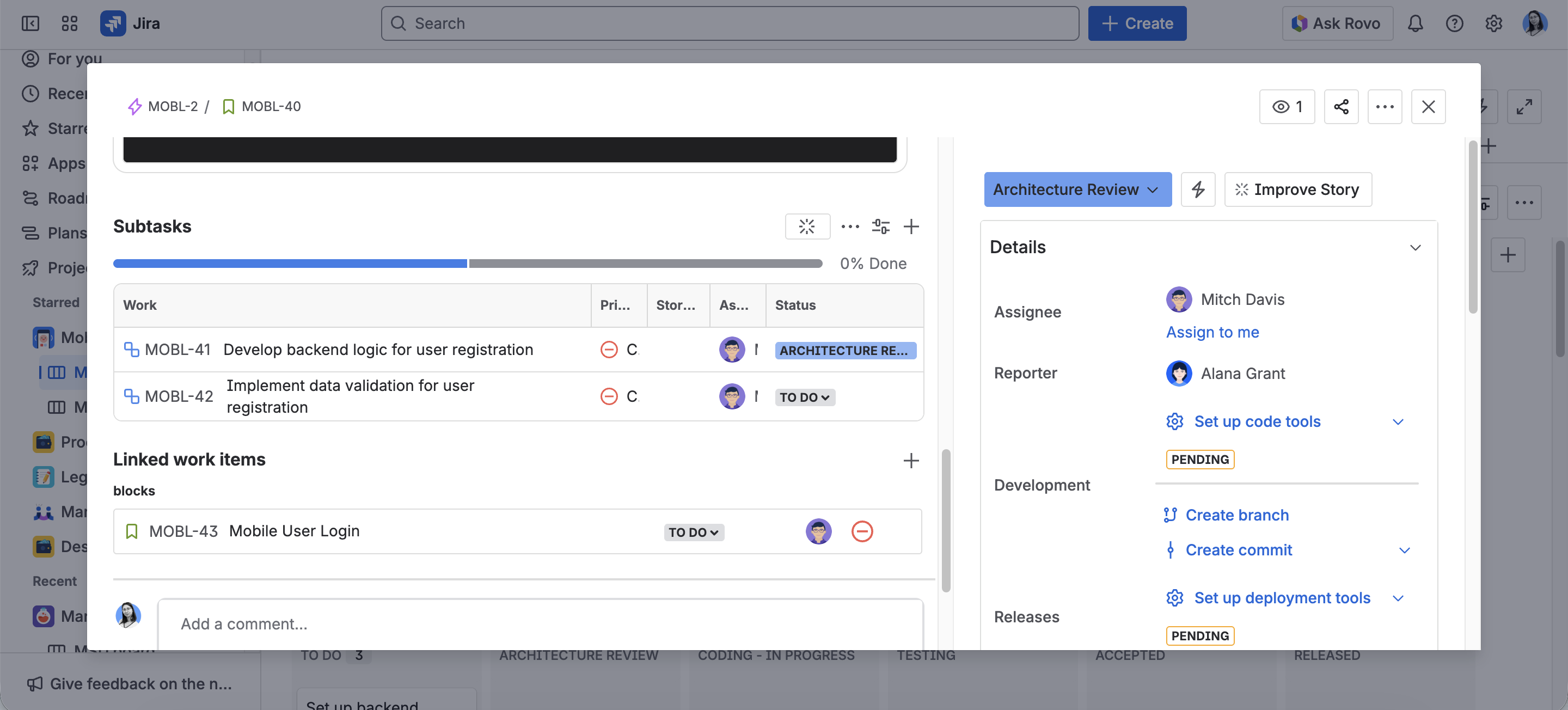
At the heart of Jira are issues (now called work items) - the core work units within a project. These can represent tasks, bugs, stories, epics, or any custom type your team defines. Each issue contains key details like description, assignee, due date, status, and category.
Issues can also be divided into subtasks to make work more manageable and improve visibility into smaller steps.
5. Reports and Dashboards
Jira makes it easy to create custom dashboards and reports that reflect what matters most to your team. There are ready-to-use templates for metrics like Created vs. Resolved Issues, User Workload, Time Tracking, Pie Charts, and more - covering areas such as Agile, DevOps, issue analysis, forecasting, and management.
In Jira, a dashboard is a collection of “gadgets”, or pre-installed data displays, that show various types of real-time information to help you track and monitor your work across projects. Dashboards summarize key project information, such as tasks due today or progress across teams. You can create multiple dashboards, personalize them, and share them with others - ensuring everyone stays aligned.

6. Integrations and add-on apps
The Atlassian Marketplace offers over 8,000 apps and integrations from more than 1,800 partners - allowing teams to extend Jira, Confluence, and other Atlassian tools. Additionally, Jira connects with other popular technology tools like Slack, Figma, or G Suite through integrations from Platform Partners.
A few examples of Jira Cloud apps include:
- ScriptRunner by Adaptavist - Add custom scripts and extend Jira’s functionality.
- Timesheets by Tempo - Track and report employee work hours directly in Jira.
- Issue Templates Agent by Appsvio - Create new issues faster using pre-defined templates.
- TeamBoard ProScheduler by DevSamurai - An all-in-one solution for project and resource management in Jira, including capacity planning, portfolio management, WBS, roadmaps, and calendars.

7. Initiatives - working toward shared goals
Imagine a large, complex objective that can’t be achieved overnight - like launching a new website, optimizing production processes, or increasing sales by 30% next year. These are initiatives - strategic, long-term goals that involve multiple teams, departments, and smaller projects.
In Jira, initiatives can be broken down into manageable pieces, planned, and assigned. This structure creates a clear work hierarchy, showing who’s responsible for what, which tasks are priorities, and where delays occur. Management gains full visibility into progress and can make data-driven decisions about project direction or business strategy.
Psst… this example comes straight from our Jira demo! Want to see how it works in practice? Get in touch with us via the contact form.
Summary
Jira is a flexible tool designed for all types of teams - including manufacturing. It helps companies improve work quality, spot bottlenecks, and reduce repetitive tasks. Because Jira Cloud is accessible via a web browser, it requires no extra IT infrastructure and can be deployed and tested quickly. See our demo and try out Jira for yourself 🙂

Marketing and creativity fairy, responsible for branding, content creation, and promoting our services. With an academic background in cybersecurity and a passion for marketing, she combines the best of both worlds. If you're looking for a conversation starter, Canva designs and good books are always great topics with her!

Simplify tasks and teamwork with Atlassian

Unlock business growth with Salesforce

Transform your data into smart decisions with Splunk


.png)
.png)
