The AI revolution has brought new features, but not without a cost. In 2026, Atlassian announced that it would introduce usage-based pricing for part of its services. Some people predicted this with AI agents and Rovo capabilities, but the scope is broader. In this article, we explain what has changed compared to the “old” per-user model, what you may now pay extra for, and how to keep those costs down.
What is Atlassian usage-based pricing and how does it work?
In recent years, Atlassian has billed customers for Jira, Confluence, and other tools on a per-user (per-seat) basis. The bill depended mainly on the number of users, and although most features came with usage limits, those limits were defined differently across products, hard to track, and rarely affected what customers actually paid. Atlassian is now introducing a completely new approach that takes long-overlooked limits into account.
Starting December 3, 2026, usage-based pricing will add a second layer of costs in the form of extra charges for exceeding the usage limits included in your plan. For instance, if your Jira automations execute more steps than your plan permits, you will be charged Atlassian's set rate for the excess usage.
❗️ Per-seat pricing isn't going away. Usage-based pricing only applies to certain features, which are listed below. You only pay extra once you exceed the allowance included in your plan.
→ Every paid Cloud plan includes a monthly allowance in the subscription price.
→ Extra charges apply only after you've used the allowances and prepaid packages.
→ Allowances are pooled across the whole organization and reset every month. Unused capacity doesn't carry over.
What does “prepaid” mean?
A prepaid package allows you to purchase usage capacity at a lower price before the start of a billing period. The purchased pack is added to your usage limit. Usage is drawn from your included monthly allowance first, then from prepaid packs, and finally from extra usage billed at the pay-as-you-go rate. This means that you will not incur extra charges until your prepaid pack is used up.
There are two types of packages available for purchase:
- Usage packs supplement your monthly allowance. Anything you don't use in a given month is lost. Annual packs add a fixed amount of capacity to your annual agreement. Monthly packs are coming soon.
- Committed packs work more like gift cards. They are an annual prepaid balance that your organization can use whenever needed during the year. Unused tokens do not carry over.
The following capabilities are planned, with availability varying by meter and product to launch by December 3, 2026. Other ways to increase capacity or stop limits are described in the chapter "What happens when you exceed the limit?"
Table source: https://www.atlassian.com/licensing/usage-based-pricing
What is billed and what is included in the package
With usage-based pricing (UBP), the included allowances depend on your plan and the number of users. These allowances are pooled across the organization and reset every month on your billing date; any unused units expire. In Atlassian Administration, you can track usage, set limits, and forecast costs.
Once you exceed the included limits, extra charges apply according to each feature's billing rules. Higher plans and collections add more per user to the shared pool.
Included allowance
The included allowance is the amount of resources or operations you can use as part of your subscription without paying extra.
- The size of the allowance depends on your plan.
- Each Atlassian feature has its own limit.
- Limits are measured in different units, such as objects, AI credits, or automation steps.
- Once you go over a limit, you may be charged for the extra usage, but you can monitor it for each feature.
1. Rovo Credits (AI)
Rovo credits are given per licensed user per month and then combined into one shared pool for the organization. Credits are used up by billable events, and how many credits an event costs depends on the action.
For example, if you have 100 Confluence Premium users and 100 Jira Premium users, your organization gets (100 users × 70 credits) + (100 users × 70 credits) = 14,000 Rovo credits per month.
What uses Rovo credits
- AI features
- Free: AI built into Atlassian apps, such as Rovo Search, definitions, and summaries.
- Basic (10 credits per event): Rovo Chat quick answers, creating Rovo spaces, Workforce Management Routing, and basic Rovo agents (no model choice).
- Premium (credit cost varies): advanced Rovo agents (with model choice), Rovo Chat "Think deeper", Confluence slides, Agents in Jira, Jira Coding Agent, Request Resolver, Alert Intelligence, Self-service Agent, and Create with Rovo.
- Teamwork Graph context
- Free: installing the Teamwork Graph CLI and Rovo MCP, and commands that look up or update information within a single Atlassian product.
- Enriched (cost varies, usually 1–10 credits per call): complex queries, lookups that span several products, and unified search through the Teamwork Graph CLI and Rovo MCP.
2. Assets Objects
Assets objects are counted differently from Rovo credits. Instead of measuring how much you used during the month, Atlassian counts how many objects you have stored at a given moment. The count doesn't reset. If you have 20,000 objects this month, you'll still have 20,000 next month unless you delete some. Allowances are pooled at the organization level.
3. Automation Steps
Automation runs repetitive tasks for you based on rules you set up. Usage is measured in steps, and every part of a flow that runs counts as one step - trigger, condition, action, branch, and loop. Runs without actions are free. If a flow stops before any action runs, none of its steps count.
For example: trigger → check priority → assign user → send notification = 4 steps.
What doesn't count as an automation step?
- System steps: Log action, Create variable, Create lookup table, Re-fetch work item data, and Lookup work items don't count, even when they're part of a flow.
- Aborted or throttled runs: no steps are charged, including any that ran before the run stopped.
- Atlassian errors: steps that fail because of a problem on Atlassian's side.
Rovo actions such as Use Rovo, Use agent, and Use Jira Coding agent are billed in Rovo credits, not automation steps. The other steps in the same flow still count toward your automation allowance. Actions that call third-party AI tools, such as Use Cursor and Use GitHub Copilot, do count as automation steps.
4. Bitbucket (Pipelines, LFS, Packages)
Under UBP, Bitbucket allowances have moved from the individual workspace to the whole organization. Each Bitbucket meter - build minutes, LFS, package storage, and package network - tracks a different type of resource and uses different units of measurement:
5. Customer Service Management (CSM) AI agent resolutions
Customer Service Management is Atlassian's app for supporting external customers, and is part of the Service Collection. Its AI agent can handle a customer request from start to finish without a person stepping in.
CSM plans don't include a free allowance for AI agent resolutions. You pay $1.00 per resolution (November 2026), starting with the first one. A resolution only counts when the AI agent handles the whole request, from the first question to a confirmed fix, without passing it to a human. The AI agent is available on Standard, Premium, and Enterprise plans.
6. Virtual Service Agent
The virtual service agent is included in Service Collection Premium and Enterprise plans to support employee self-service. These plans include 1,000 assisted conversations per month (or 12,000 per year) at no extra cost.
Does sandbox usage count toward my allowance?
It depends on the feature:
What happens after exceeding the limit?
Going over a limit affects two things: your bill and how features behave.
On the billing side, you have several options that trigger various actions when a limit is exceeded:
- Allow extra usage: everything keeps working as usual, and you're billed at the published Atlassian rates.
- Set a spending limit: organization admins can set a monthly cap on extra usage and change it at any time. Once you reach the cap, no more extra usage is charged and the affected features may be limited. An Atlassian Partner can turn off extra usage in the Partner Purchasing Center (PPC), but only the customer's admin can set the limits themselves.
- Turn off extra usage completely: features are limited once your allowance runs out (see for more details below), but you won't pay anything extra.
- Buy a prepaid pack: pay in advance, at a discount, for extra capacity. It's used right after your included allowance (see chapter "What does 'prepaid' mean?").
Limits only affect the feature tied to that specific meter, not the rest of the system.
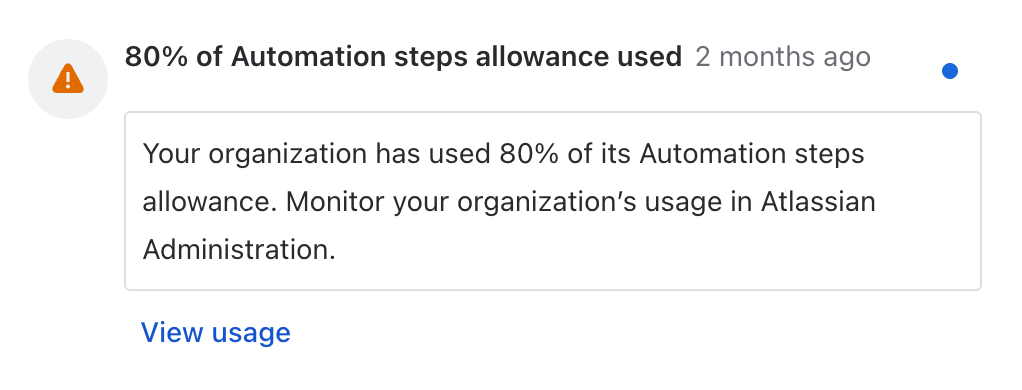
Organization and billing admins are notified at 80% and 100% of the included allowance, and when a set limit is reached. Extra usage appears on your next invoice at the end of the billing period. By default, extra usage (postpaid billing) is turned on.
How an exceeded limit affects features
Rovo credits
Billable Rovo interactions and enriched Teamwork Graph stops. Free AI features keep working (Rovo Search, summaries, chart insights, and definitions – read more in the chapter above).
Assets objects
Objects stay the same until you delete them, so your count doesn't reset each month. The Platform usage dashboard shows how your object count grows or shrinks over time, not how much you "used" this period. When you reach your allowance, extra usage turns on automatically, so you can keep adding objects without interruption. If you've turned off extra usage and haven't bought a pack, you won't be able to add new objects until you delete some or buy more capacity.
Automation steps
New flow runs stop. Triggers won't start any flows until your allowance resets at the start of the next billing period, or until you add a usage pack or committed pack. Flows that are already running will finish. Events aren't queued, so anything that would have triggered a flow during the pause isn't saved or replayed later. Flows with manual triggers are paused as well.
Everything else keeps working: work items, workflows, and manual processes aren't affected. Your flows stay set up and start running again automatically once your allowance resets or you add a pack. Admins can check the automation audit log to see which flows would have run during the pause.
Bitbucket
To keep existing pipelines from breaking, extra usage billing for build minutes is turned on automatically. After you've used up your build minutes, usage continues to be tracked and is billed in your next billing cycle. If extra usage is turned off, pipelines stop running until usage resets the following month.
For Packages storage, new uploads are blocked. For Packages network, downloads keep working for a one-week grace period and then stop until your limits reset.
Example pricing after exceeding the allowance
An example from Atlassian's documentation.
Automation: extra steps cost $0.50 per 1,000 steps (November 2026). You can estimate the cost with this formula:
(Steps used in the month − included allowance) ÷ 1,000 × $0.50 = estimated extra charge
For example, a team of 10 Jira Standard users gets 4,000 steps per month. If they use 24,000 steps, the extra cost is (24,000 − 4,000) ÷ 1,000 × $0.50 = $10.
Who should worry the most
The truth is that anyone who uses Atlassian products should check their usage to avoid any surprises. Below, we’ve listed the environments that are most likely to result in higher bills, but that doesn’t rule out the need for a health check on other instances.
Companies with high Rovo usage
Rovo AI usage is measured in credits. Companies that use Rovo extensively may exceed their monthly allowance and need to pay for additional usage or purchase prepaid credit packs.
Companies running automation at scale
Cloud Enterprise plans previously offered unlimited automation. With usage-based pricing, these plans will have a fixed monthly allowance shared across the organization. Additional charges will apply at the first contract renewal on or after December 3, 2026.
Companies with large Assets databases
Atlassian counts the number of unique objects stored in an organization during a billing month. Companies managing large inventories or configuration databases may face additional costs if they exceed their included allowance.
Bitbucket customers on annual plans
Build Minutes, Git LFS Storage, Packages Storage, and Packages Network will now have shared allowances at the organization level. Starting December 3, 2026, annual plan customers will be charged for usage that exceeds these limits.
Teams using complex automation rules
Instead of counting entire automation runs, Atlassian will count individual steps, such as triggers, conditions, actions, branches, and loops, in runs that perform at least one action. This means a 20-step automation will use much more of the allowance than a simple 2-step rule.
Public sector organizations
Public institutions often work with fixed annual or multi-year budgets. Additional charges that vary from month to month can make it harder to plan expenses and stay within budget requirements.
How to control it
Customers use Atlassian Administration to track, manage, and forecast usage and costs across all meters. Partners can review their customers' usage in the Partner Purchasing Center (PPC).
To estimate your costs ahead of time, you can use Atlassian's usage calculator.
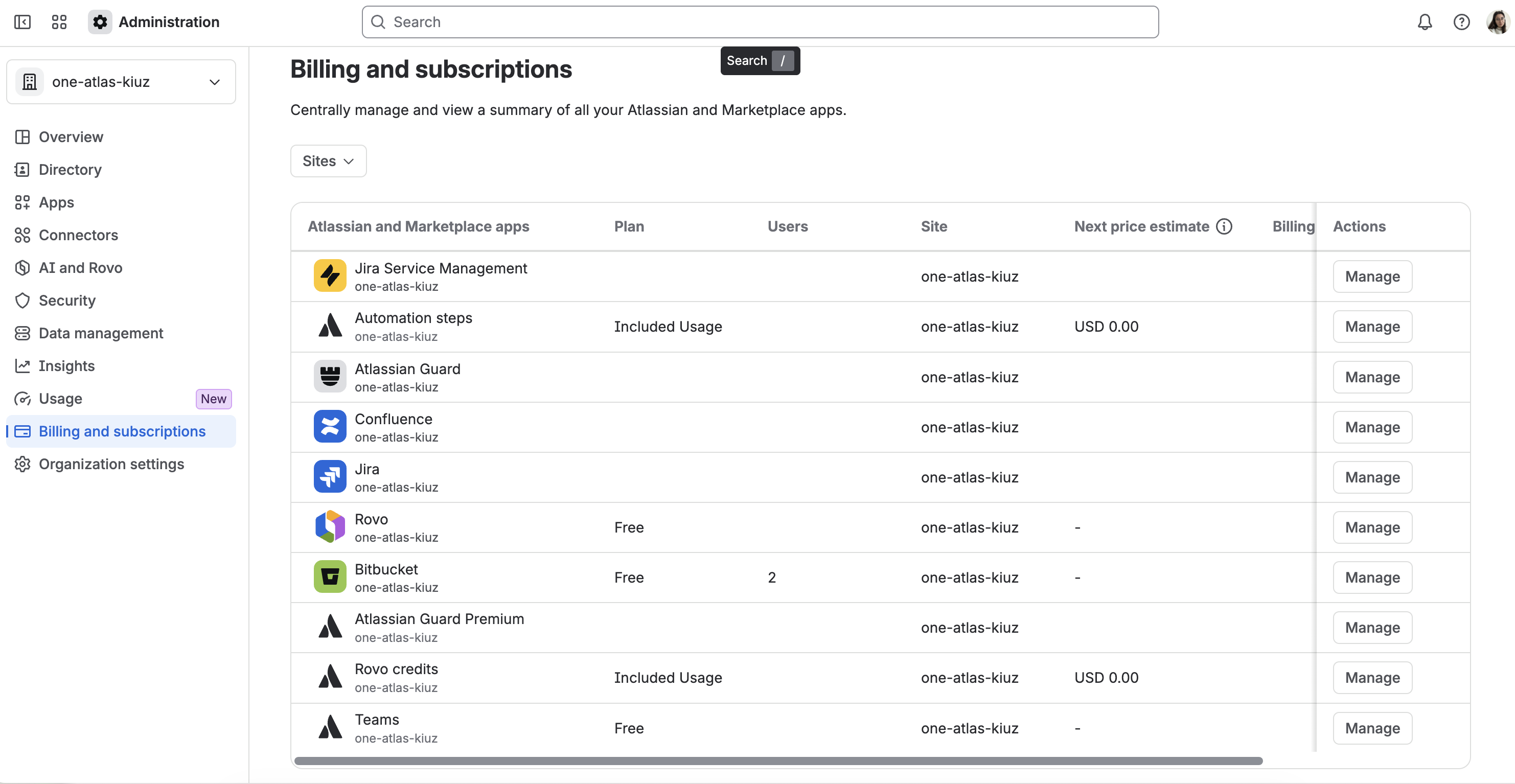
To view usage from Billing and subscriptions in Atlassian Administration:
- Go to Atlassian Administration and select your organization if you have more than one.
- Select Billing and subscriptions in the left sidebar.
- Select the meter from the Subscriptions list.
- On the subscription details page, use the tabs to see which app subscriptions contribute to your usage, your linked subscriptions, and your billing history.
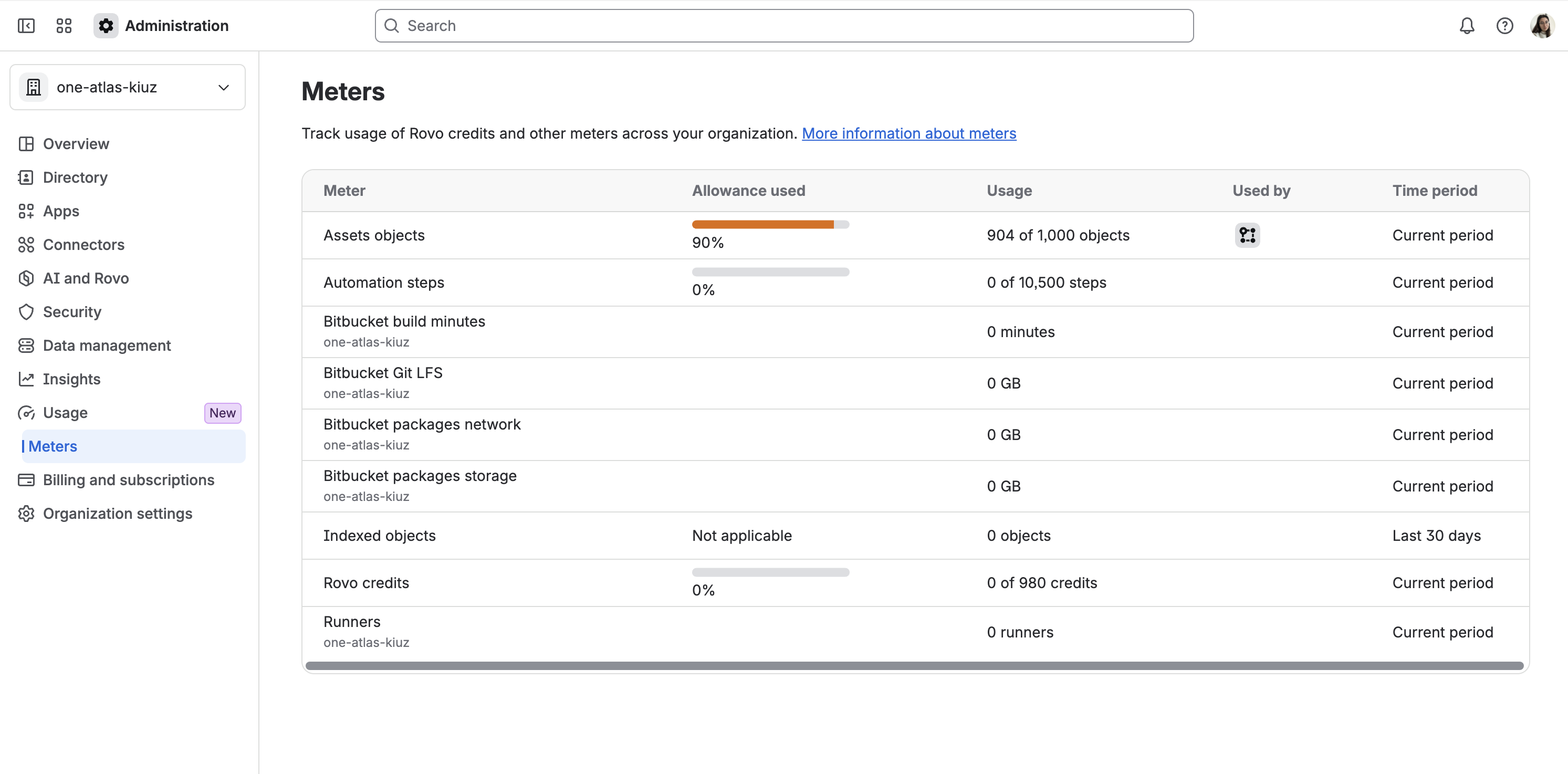
Organization admins can also view usage from the Usage page:
- Go to Atlassian Administration and select your organization if you have more than one.
- Select Usage, then Meters.
- Select a meter to see its details.
How to optimize the usage
Optimizing usage depends on the instance and its performance. At Peakforce, we conduct health checks for our clients to identify areas for improvement. Several of these relate specifically to features used in usage-based pricing:
Teamwork Graph
Teamwork Graph is the part of the Atlassian platform that structures data from Atlassian apps and connected third-party tools. Atlassian’s Teamwork Graph maps the people, projects, and relationships that define how work actually gets done. That means it delivers results that are relevant, contextual, and permission-aware, mapped and pre-joined before reasoning begins, including connections inferred through machine learning.
Enriched Teamwork Graph helps reduce costs under a usage-based pricing model, because a better source of knowledge means better Rovo searches and less credit usage. precisely grounding queries in the work context prevents interactions from being wasted on irrelevant responses.
AI adoption
It’s worth considering who should have access to Rovo and who needs it for day-to-day work. Implementing an AI in a mature way as part of the workflow can reduce the number of credits needed.
Automation
There's usually more than one way to build an automation rule, and the design affects how many steps you use. Very detailed rules that perform many small, separate operations use up more of your allowance. If you redesign them, you can lower your usage and your costs.
Optimizations include examples like:
- moving the condition to a trigger, if possible
- combining criteria into a single condition block
- limiting unnecessary scheduled runs
- removing unnecessary counted actions
- analyzing the number of actions actually performed in loops
Assets
How you model your data in Assets affects how many objects count toward your limit. Not every piece of information needs its own object. Often an attribute on an existing object is enough. A well-planned Assets structure keeps your object count, and your usage, lower.
Upgrade to higher plan or from single product to Collection
This isn't usage optimization per se, but it can be a modification to better align with usage. Higher-tier plans have a larger included allowance, just like collections (e.g., Jira vs. Teamwork collection). It is recommended to conduct an environmental analysis regarding the use of products and what plans are worth purchasing.
How Atlassian Partner can help
Working with an Atlassian Partner has many benefits, and they apply also in the context of usage-based pricing.
One of the advantages is the expertise and knowledge of the system. A partner should help you optimize your usage, point out which features are likely to generate extra costs, and check your current usage against your limits. They can also review your automation and Assets setup, suggest changes that reduce the number of billable operations or objects, help you get ready for the new billing rules, and advise you on buying extra capacity. The other advantage is the price and partner discounts. For Atlassian Partners, usually prepaid packs come with better prices than standard extra usage.
As a partner, Peakforce also keeps clients up to date. We've already sent our business partners details of the new billing model, along with explanations and how to prepare for the changes. This is a broad topic and certainly worth a longer discussion. If you'd like to learn more about how usage-based pricing affects your bill, please book a free consultation with us.
Summary
Atlassian usage-based pricing doesn't automatically mean higher costs for every customer, but it affects features like Automations, Rovo, or Assets. How you use and set up your tools directly affects your bill, and good optimization is the key to a lower bill at the end of the month.
Sources:
https://www.atlassian.com/licensing/usage-based-pricing#how-allowances-work
https://support.atlassian.com/rovo/docs/rovo-usage-limits/
https://www.atlassian.com/licensing/assets#understanding%20assets
https://support.atlassian.com/cloud-automation/docs/how-is-my-usage-calculated/

Marketing and creativity fairy, responsible for branding, content creation, and promoting our services. With an academic background in cybersecurity and a passion for marketing, she combines the best of both worlds. If you're looking for a conversation starter, Canva designs and good books are always great topics with her!

Wojciech helps organizations make Atlassian solutions work for them, not the other way around. He’s always believed that great implementations need more than configuration - the right approach, clear standards, and a strong delivery environment. Outside of work, he describes himself as a fan of all kinds of boarding (snowboarding, surfing, skateboarding, etc.). He also enjoys mountain biking and travelling to lesser-known places with very different cultures.

Simplify tasks and teamwork with Atlassian

Unlock business growth with Salesforce

Transform your data into smart decisions with Splunk